I'm Mindy, all I do here is blog about circle lens reviews, make-up reviews, tutorials and other stuff.
I hope you enjoy my blog.
See you around ♡


 Instagram
Search
Follow upcoming posts

 Skinfood Black Sugar Strawberry
HERA UV Mist Cushion in #23
Aritaum Mono Eyes #Steal Away
VT Collagen Pact
Missha M Magic Cushion #23
A'Pieu Air Fit Cushion #21
Peri Pera Ink The Velvet #14
A'pieu Water Light Tint #RD03
Banila Co. CC Cream
Adaline Keep Cool Sheet Masks
Tony Moly Gel Eyeliner in brown
Jayjun Gold Snow Black Mask
Jayjun Real Water Mask
Jayjun Multi-Vita Tone Up Mask
Skinfood Black Sugar Strawberry
HERA UV Mist Cushion in #23
Aritaum Mono Eyes #Steal Away
VT Collagen Pact
Missha M Magic Cushion #23
A'Pieu Air Fit Cushion #21
Peri Pera Ink The Velvet #14
A'pieu Water Light Tint #RD03
Banila Co. CC Cream
Adaline Keep Cool Sheet Masks
Tony Moly Gel Eyeliner in brown
Jayjun Gold Snow Black Mask
Jayjun Real Water Mask
Jayjun Multi-Vita Tone Up Mask
Contact

Giveaways

disclaimer
Pixel: Pixel-Diary
All reviews on this blog are 100% my own honest opinions. Photos and content on this blog are all mine unless stated otherwise. Do not use them without my permission! Keep in mind that I used precious time out of my life to work on this. Thanks! 
|
_

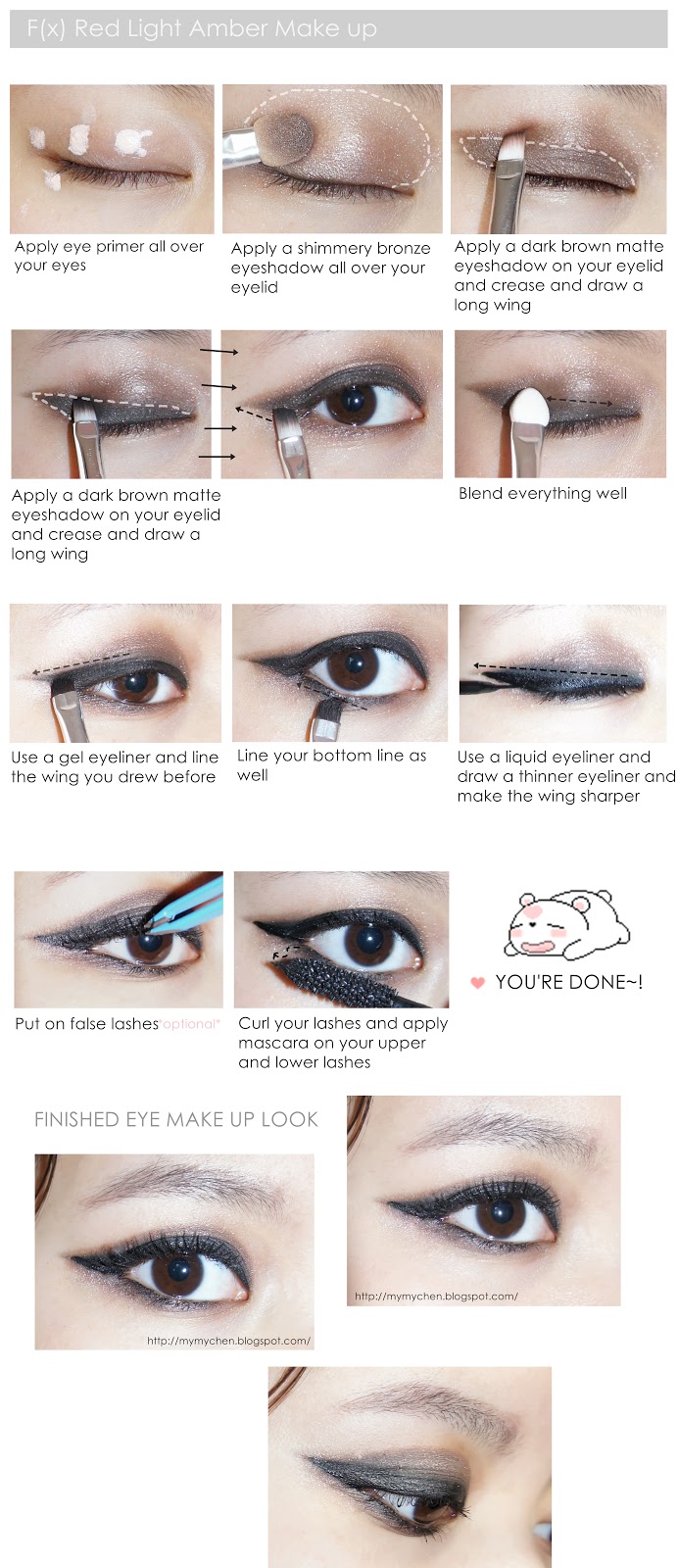
Todays post is going to be makeup tutorial on how to do Amber's 'Red Light' make up on the teaser photos for F(x)에프엑스 comeback with the new song 'Red Light'. Honestly, their comeback was a big disappointment for me because I don't like their new song. No comeback has ever disappointed me as much as this one because I find their older songs much better. But who knows, maybe I will get used to this song after listening to it for a while ^^;;
Emily from http://emilymarysia.blogspot.com was kind enough to invite me to join her collaboration with 3 other bloggers. I'm going to post their blog urls at the end of the post with their finished posts. Please check out their blogs, they're all really good beauty and fashion bloggers and I really enjoy reading their blog posts when I'm on blogger~
Here are the teaser photos from Amber in Red Light
   The makeup look is quite heavy and super smokey. I noticed that the other members have this kinda 'ying-yang' concept in their eye make up with one side being smokey and the other natural make up. I don't know if it's the same with Amber's look though because you can't see her other eye in any of her teaser photos so I'm guessing it's not like that? I only made the smokey eye makeup and leave the makeup of the other eye up to you lol. So here's the make up tutorial: 
Anyways, here are the other bloggers and the link to their makeup look

Emily as Sulli [TUTORIAL]
 
Aimee as Luna [TUTORIAL]

April as Victoria [TUTORIAL]
 Labels: fx red light, inspired makeup look, makeup tutorial, red light make up, tutorial, 에프엑스 _
Hello Everyone~!

Today I want to share with you a small make up tutorial inpired by Ulzzang Pony.
Valentine's Day is coming up soon and I see bloggers do special blog posts for it. I wanted to do something like a 'special' for it too but I don't have a bf ._. so here's a really small eye make up tutorial instead OTL
I went for a kind of pinky image because valentine's day is all about love and pink seemed to be the best color for it imo (it's also really cute *^* ) I hope you will like my tutorial and have fun reading or trying to recreate this look too~^^
*~Here we go~*

Products used:
88 Color Palette
Kiko High pigmentation Eyeshadow #129 Macropearly light beige
Maybelline The Colossal Volum' Express waterproof (1st coat)
Le volume de Chanel Mascara #10 Noir (2nd coat)
Artdeco Soft Eye Liner waterproof #11 Brown
NYX Jumbo Eye Pencil #608 Cottage Cheese
G&G/Dueba Alamode Brown
More photos of the eye make up
  
OK I look super stupid with my eyes closed .__."
Thanks for reading my really short make up tutorial ~
Leave a comment below if you want and follow me lol
Labels: makeup, makeup tutorial, pink makeup, pony golden rose, pony golden rose makeup, pony makeup, special, tutorial, ulzzang makeup, ulzzang pony, valentines day make up _
Hello guys~!
Here's a quick tutorial how to make those wiggly cat ears on photos. I used Song Ah Ri's picture because she's so cute. Let's make this gurrl cuter~
Start photoscape and click on Editer.
Open the picture you would like to edit and click on the 'Tools' button
 Click on Paint Brush and choose the color and brush size you would like to use to draw your cat ears. Draw cat ears on your picture 
Save this as new picture. After that repeat the steps above till you're at the Edit step again. This time you will have to click 'Obeject'. You will have to open the first picture you edited.
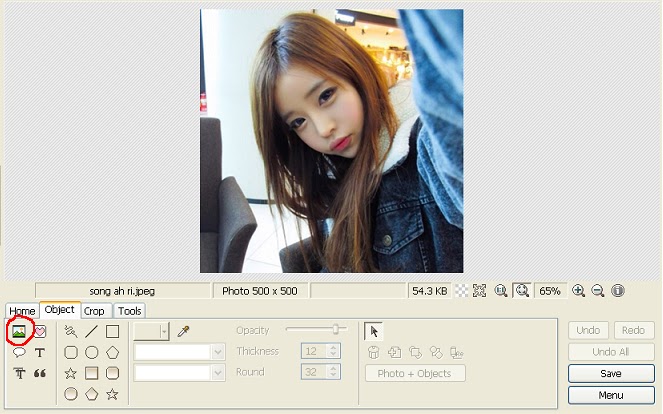
This window will appear. Adjust it to 100. The first picture with the cat ears will become transparent

Click 'Tools' again and draw cat ears in a different position again. Don't draw them exactly like in the first picture because otherwise they won't move.

Here's how I drew the second cat ears:

Click 'Object' again and click on your picture and delete the first layer . Only the second layer with the cat ears should be visible now. Save that as new picture too.

Click on Animated GIF and add the first and second pic.
Save it  
FINISH !!! ♥
 Labels: cat ears, gif, gif tutorial, photo editing, photo editing tutorial, photoscape, song ah ri, tutorial, wiggly cat ears, wiggly ears |